Mobile sales & services
Share the live location of mobile retail, cafés, repair, care, and other businesses.

Create a page for your food truck, pop-up, or other business on the move. Share the link in your social media bio or messages so customers can check your status, location, and menu in their browser.
Live status & location
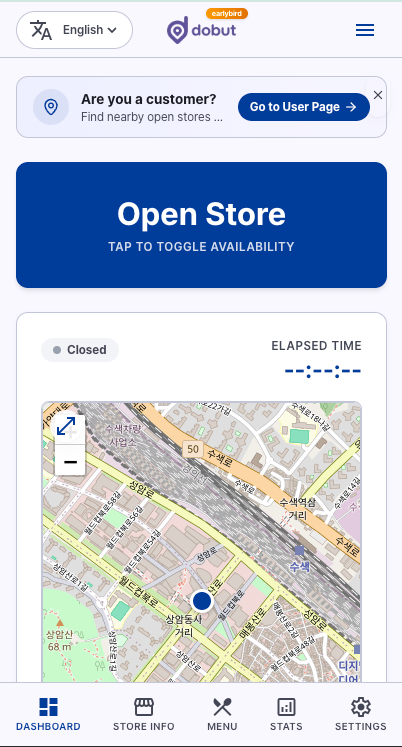
Live status & location
One link to share anywhere
The story behind our name
Dobutsangin were traveling merchants who moved between markets and villages without a fixed shop.
dobut is their digital counterpart: a page that moves with you, so customers always know where to find you today.
Use dobut around how you operate, not a rigid category. Businesses beyond these examples are welcome.
Share the live location of mobile retail, cafés, repair, care, and other businesses.
Publish the location, operating period, and offerings of temporary stores and pop-ups.
Let customers find repair, car care, inspection, and other services that move closer to them.
Promote schedules and locations for events, workshops, exhibitions, and creator booths.
Built for mobile businesses and useful for businesses with a fixed location too.
DOBUT FOR BUSINESS
One link for your current status and location.
01 / 04
Open for business and customers can see your status and location on your page. Close and you're removed from the map of open businesses.
TRUST & CONTROL
Your current location appears on the map when you open and is removed from the map of open businesses when you close.
The current location appears on the customer map only after you choose to start operating.
When you close, your business is removed from the map of open businesses. Your page may show your last operating area.
Customers open a QR code or link to see your location and offerings directly in a browser.
START SMALL, GROW CLEAR
STEP 1
Create a free account and add your business details and offerings.
STEP 2
Put your page on social media, in messages, on your website, or in a QR code.
STEP 3
Start operating and set your location so customers can check your page.
Already have an account?
Share your page in your social media bio, messages, website, or as a QR code so customers can check your status.
Why we made dobut
Posting each day's location on Instagram and sharing it individually by phone and text was more work than I expected.
I thought it would be easier to share the day's location and whether I was open on one page. That's how I came to create dobut.
Find the essentials before running your business with dobut.
No. Customers open a QR code or link to view your business page and current location in a browser.
Your location appears on the map when you open and is removed from the map of open businesses when you close. Your page may show your last operating area.
No. Pop-ups, mobile services, event booths, and businesses with a fixed location can all use dobut.
Place it on signs, packaging, business cards, or social media so customers can instantly open your page and current location.
Manage location, operating status, products or services, photos, QR codes, notices, review replies, analytics, and display features.